


Action Network BetSync is our automatic bet-tracking feature that links eligible sportsbook — and now prediction market — accounts to your Action Network profile.
Your wagers and event contracts appear instantly in the app. Instead of manually logging every bet or trade after you place it, BetSync imports them directly into “My Action” for live tracking, analytics, win probability updates, alerts, and long-term performance stats.
BetSync works one way: from your sportsbook or prediction market account into Action Network. It does not place bets for you, and picks you track in the Action app, do not sync back to your book or exchange.
How BetSync Works (Step by Step)
Setting up BetSync is straightforward inside the Action app:
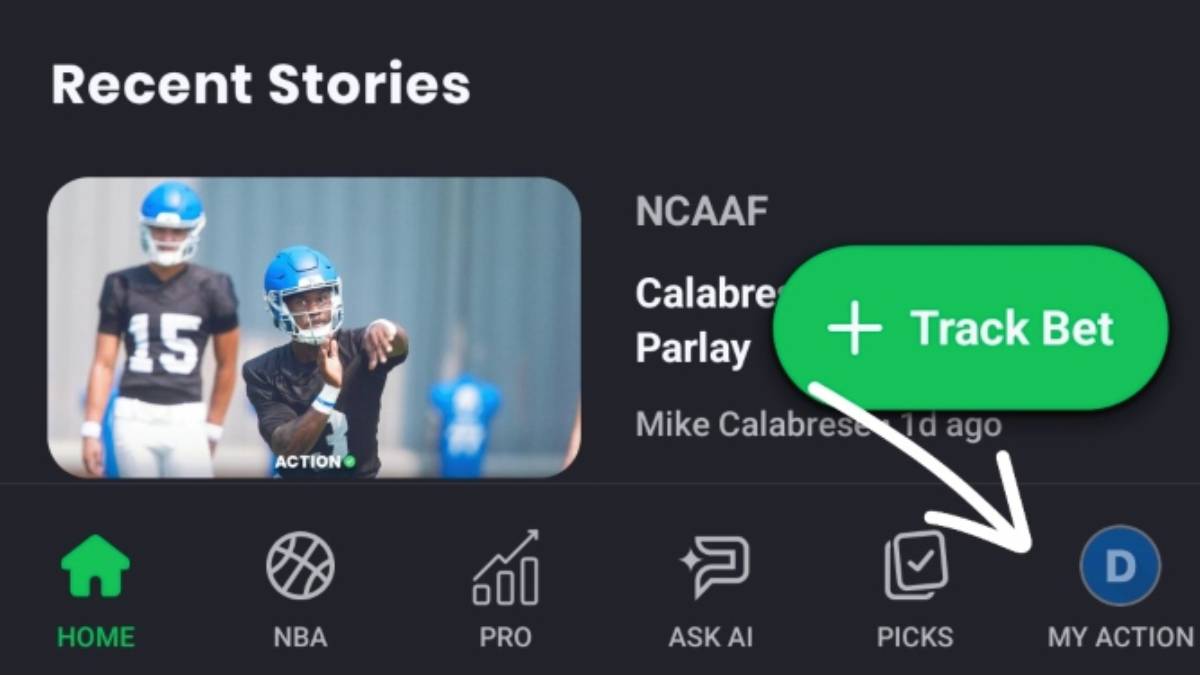
Download the Action app and sign in or create an Action Network account – Tap “My Action." It will be located in the bottom right corner of the app's home page.
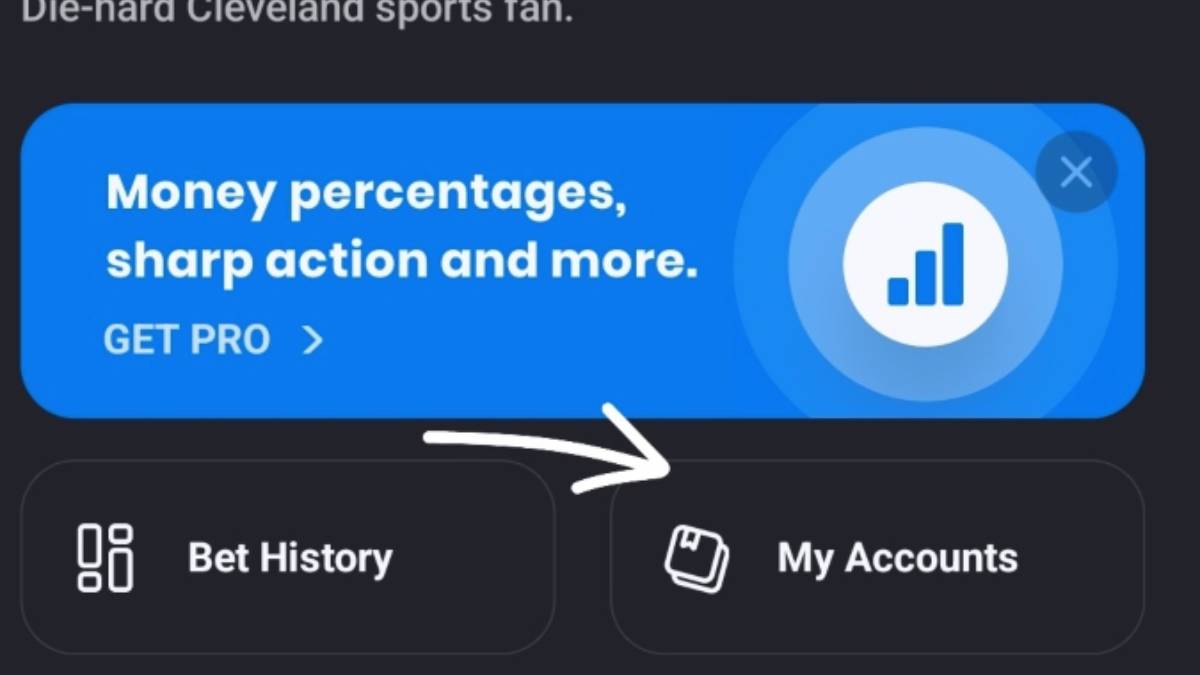
Secondly, you'll open Settings, and select “My Accounts. It will be in the middle of the page after clicking "My Action.”
Under "My Accounts", you can choose a supported partner (sportsbook or prediction market) and log in to connect it.
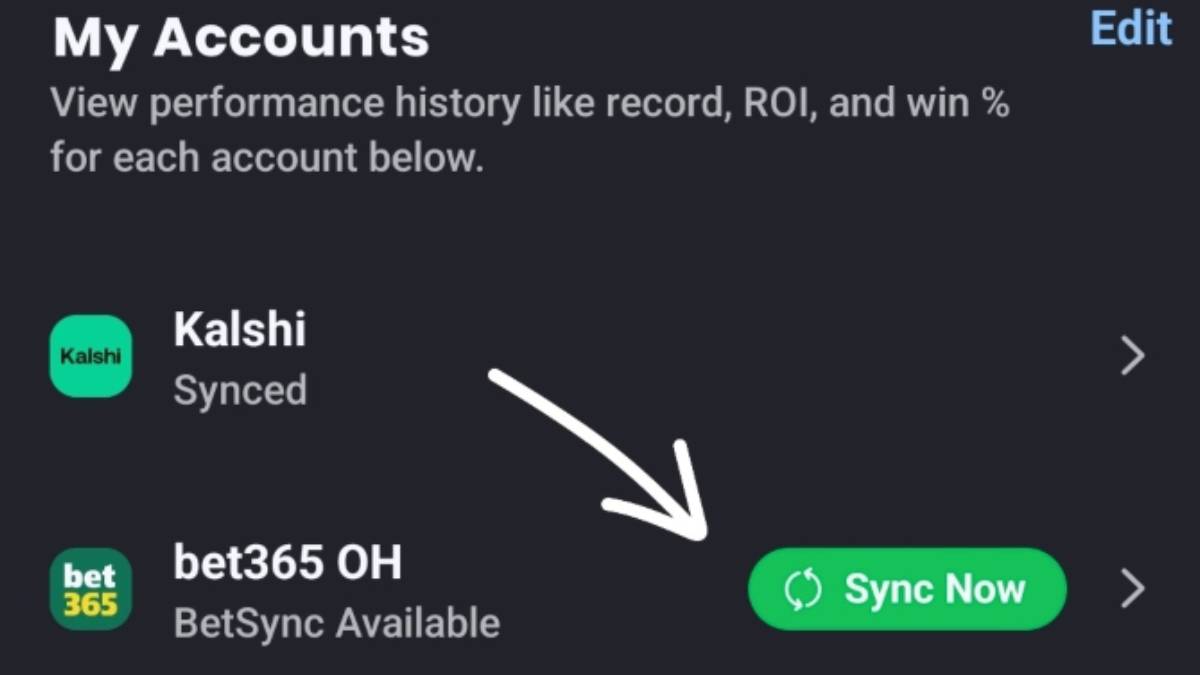
Place eligible bets, or event-contract trades, at that partner. They should automatically appear in your Action profile.
If not, all you have to do is upload a screenshot of your bet slip, and BetSync takes over from there. It's that easy.
Because partnerships and state availability can change, the most reliable way to confirm which books or markets you can connect is inside the app under My Action → Settings → My Accounts. Availability also depends on your state and the partner’s integration status, so some books or markets may be added or removed over time.
What Bets and Markets Does BetSync Track?
BetSync generally supports the same bet types the Action app already tracks, including:
- Spreads
- Moneylines
- Totals/Team Totals
- Futures, parlays
- Teasers
- Parlays
- Player Props
BetSync removes the biggest pain point of personal bet tracking: manually re-entering odds, stakes, and outcomes across multiple books. That’s especially helpful for line shoppers who use several sportsbooks or trade across prediction markets.
Once connected, your full betting history lives in one place with performance dashboards, live win probability, and alerts—no spreadsheets required.
Prediction Markets on Action Network
Action Network has significantly expanded its prediction markets coverage, adding dedicated sections for real-time odds, trending event contracts, and side-by-side comparisons with sportsbook lines. Our platform also features a Prediction Markets Leaderboard that tracks top traders’ performance (PnL, volume, etc.) across major venues like Polymarket and Kalshi, plus reviews, promo codes, and educational guides.
With BetSync now extending to prediction markets, users can connect Kalshi or Polymarket accounts so trades automatically populate in “My Action,” just like sportsbook bets. This creates a unified view of both traditional wagers and event-contract trades for better bankroll management and analysis.
Kalshi vs. Polymarket: What’s the Difference?
Kalshi and Polymarket are the two largest prediction market platforms available to U.S. users, but they operate on different models.
Kalshi is a CFTC-regulated designated contract market that holds user funds in segregated bank accounts and focuses heavily on sports, economics, and policy events.
Polymarket runs a non-custodial, blockchain-based exchange where users hold their own keys; its U.S. arm. Polymarket is also CFTC-licensed and dollar-funded, while the international version uses crypto rails and is geo-blocked in the U.S.
Importantly, settlement rules can differ between the two—even on the same event—so traders should confirm the source, deadline, and event definition before placing matching trades on both platforms.
How to Get Started with BetSync for Prediction Markets
To start syncing prediction market trades:
- Open the Action app and go to My Action → Settings → My Accounts.
- Connect your Kalshi or Polymarket US account by logging in when prompted.
- Place eligible event-contract trades; they should appear automatically in your Action profile for tracking and analytics.
As with sportsbooks, not every contract type may be supported, and integrations can evolve—so check the app for the latest partner list and state eligibility. Remember, event-contract trading involves risk and may not be suitable for all investors. Always exhibit responsible trading habits.


